


Application Process
The quickest and easiest way to start your apartment search is online by visiting the Communities portion of our site. There you can browse available apartments, view photos, amenities and pricing. If you find something you like, simply click Apply Now to begin your application.
To apply, all adults in the household will need to complete a brief application and pay an application fee, which covers credit and criminal background checks. If your income, legal history, and landlord references meet our criteria, we’d be delighted to welcome you!
Prefer to tour before applying? Scheduling a tour is easier than ever! Once you’ve decided which community you’d like to tour, simply select the Schedule A Tour button located on each community page. Complete a quick request form providing your name, contact information, desired move-in date, and desired number of bedrooms. Then, select the tour date and time that work best for you—you’ll receive a confirmation once your tour is scheduled.
Same day or next day tours cannot be scheduled online. Please contact the Community Manager for same day or next day tour availability.
Scheduling a tour is easier than ever! Once you’ve decided which community you’d like to tour, simply select the Schedule A Tour button located on each community page. Complete a quick request form providing your name, contact information, desired move-in date, and desired number of bedrooms. Then, select the tour date and time that work best for you—you’ll receive a confirmation once your tour is scheduled.
Same day or next day tours cannot be scheduled online. Please contact the Community Manager for same day or next day tour availability.
If your income is insufficient, we may still approve your application if you get someone with sufficient income and a good credit history to guarantee they will pay the rent if you do not. This is often called a co-signer. They would co-sign your rental contract, making them equally responsible for rent, damages, etc. The individual will be required to complete the rental application and pay the $25 application fee to process the credit and criminal background check.
You must pay the first month’s rent plus a security deposit. Security deposits are typically one or two month’s rent and are dependent upon credit, criminal verification and rental history. The deposit is held until you move out and may be used to pay for damages beyond normal wear and tear. You will receive an itemized breakdown of its use and the balance due to you typically three to four weeks after your residency officially ends.
Some of our communities do allow pets. Look for the pet icons on the specific community listing page. The number of pets, breed, and weight restrictions may be considered. A pet deposit is required.
Utilities included in monthly rent vary by community. Look for the icons indicating what is included on each specific community page. See the example below.
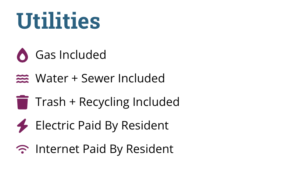
This is an example. Utilities included will vary by community.
Most communities have pay-per-use coin and card-operated laundry facilities onsite. Look for the icons indicating what’s included on each specific community page.
Current Residents
Rent can be paid directly from your bank account or using a debit or credit card. A service fee will be charged at the time of payment with a credit card or debit transaction. Brandywine Communities does not receive any portion of this fee. The service fee is non-refundable.
Debit Card Service Fees:
- Payments $1.00 to $999.99: $3.95
- Payments $1000.00 to $1999.99: $4.95
- Payments $2000 and more: $9.95
Credit Card Service Fees:
- A service fee of 2.50% will be charged at the time of payment.
Brandywine Communities does NOT accept cash payments onsite or at our main office. All cash payments must be made using PayNearMe.
There is no fee for AutoPay using a checking account.
We get it! Your plans may change and you have to move before your lease is up. Unlike most landlords, we will not require you to pay full lease term. Instead, you will forfeit your security deposit and pay a required exit fee of one or two months’ rent, depending on your community. You do need to provide 30 days’ advance notice of your intent to leave.
We have 24-hour on-call emergency services. The number for your community will be provided when you move in. Our technicians will respond during off-hours only if you have no heat, a plumbing or sewage leak that may damage property, no electricity, or a condition that may cause a fire. All other routine maintenance will be promptly addressed during normal business hours. Residents can complete maintenance requests via our Resident Portal.
To review your lease renewal options and sign for next year, login to the Resident Portal and choose the pencil icon in the menu bar to view and sign documents. Choose the folder icon to view signed documents.
No, you may renew your lease for any lease term between 6 and 18 months. The rental rate for each lease term will vary. These rates can be viewed once you login to the Resident Portal.

Online Payments
Brandywine Communities offers a Resident Portal.
To log in to the Resident Portal to pay rent online and submit maintenance requests, click the Pay My Rent (Resident Portal) button located at the top right corner of our homepage.

Payments can have the “pending” status for one or two days. Furthermore, it can take up to three business days for Brandywine Communities to post payments to your account. Please allow sufficient time for payments to process.
You can use the same login credentials you created when you completed your application if you applied online during the leasing process. If you no longer have that information or do not have login credentials click on the “Click here to register” link to create an account. You will need to provide your phone number and a valid email address to create an account.
For technical support please email support@brandywineagency.com or call 412.823.9200.
- Under the “Payments” tab click on “Payment Accounts”
- Select “Add Bank Account” or “Add Credit Card” to enter the required information then press “save.”
- Once the Payment Account has been saved, you can make a one-time payment or set up Automatic Recurring Payments using the newly entered account information.
Rent can be paid directly from your bank account or using a debit or credit card. A service fee will be charged at the time of payment with a credit card or debit transaction. Brandywine Communities does not receive any portion of this fee. The service fee is non-refundable.
Debit Card Service Fees:
- Payments $1.00 to $999.99: $3.95
- Payments $1000.00 to $1999.99: $4.95
- Payments $2000 and more: $9.95
Credit Card Service Fees:
- A service fee of 2.50% will be charged at the time of payment.
Brandywine Communities does NOT accept cash payments onsite or at our main office. All cash payments must be made using PayNearMe.
There is no fee for AutoPay using a checking account.
3 Convenient & Fee Free Ways to Pay:
- ACH one-time payment (using checking account)
- ACH recurring payments (AutoPay) (using checking account)
- Check or Money Order (Can be mailed to our Rental Office or placed in the dropbox.)
Brandywine Communities does NOT accept cash payments onsite or at our main office. All cash payments must be made using PayNearMe.
- Under the Payments tab click on the Make a One-Time Payment link.
- Select the desired Payment Account from the dropdown menu.
(If you do not have a Payment Account on file, refer to the Add/Remove Payment Account question above.) - Delete the default dollar amount and enter the dollar amount you wish to pay then press next.
- Once you have verified the dollar amount and Payment Account, check the box to accept the Terms and Conditions and press Submit Payment.
- You will receive a payment confirmation email shortly.
- One-time payments are immediately posted to your account. The payment status will display as “Payment Pending” until fully processed.
No charges available for payment means that you have a zero balance or unapplied credit; you are still able to make a one-time payment by following the one-time payment instructions above.
What if I don’t agree with my balance owed?
We can help! Please contact your Account Services Team Member.
Yes! This can be done by deleting the default dollar amount and entering the dollar amount you wish to pay.
Our team is ready to help! Please contact your Account Services Team Member directly:
The New Riverview tenants must contact their onsite office team regarding rent payment concerns.
AutoPay is a convenient option in which your rent will be paid automatically each month using your default payment method. This will avoid any late fees and free you from having to remember when to pay.
It’s important to ensure funds are in your payment account on the debit date so the payment processes successfully.
There is no fee to enroll in AutoPay using your checking account.
- Under the Payments tab click on the Set Up Automatic Recurring Payments link.
- Select the desired Payment Account from the dropdown menu.
(If you do not have a Payment Account on file, refer to the Add/Remove Payment Account question above.) - Delete the default dollar amount to enter the dollar amount for the selected Payment Account and then press next to continue
- Once you have verified the dollar amount and Payment Account, check the box to accept the Terms and Conditions then press Setup Monthly Payment to complete the Autopay enrollment.
- You will receive an enrollment confirmation email shortly.
Yes! Please contact your Property Manager for an AutoPay Enrollment Packet.
ACH payments are debited on the 5th of each month. If the 5th falls on a weekend or holiday, payments will process the following business day. We encourage residents to ensure funds are available in their account on the 5th. Payments must be submitted online by 3p EST on the 5th for it to process with that month’s ACH processing.
Please contact your bank if you have questions about their debit/processing timing.
That’s okay! If you made a one-time payment to pay the current month’s rent, AutoPay will begin the following month.
To cancel recurring payments/AutoPay you must complete an AutoPay Cancellation Form or submit a written request at least 2 weeks prior to the requested cancellation date to:
Brandywine Communities, 357 Lincoln Highway, North Versailles, PA 15137
If you feel that your Payment Account has been jeopardized, please contact us directly at 412.823.9223 for immediate assistance.
Unfortunately, if you accidentally overpay or double pay, we are unable to stop payment or return the funds to your account. The good news is the extra payment will stay on your account as a credit. Please remember you may have to stop autopay in order to utilize any rent credits for the following month. If you have any questions on how to use your rent credits and next steps to take, please reach out to our Rental Office for assistance.
If a payment has been returned unpaid by your financial institution, the online payment option will become temporarily disabled. (Returned payments may occur due to insufficient funds, by using a closed or invalid payment account, issuing a stop payment request, issuing a check with a questionable or missing signature, etc.) The online payment option will become available once the return process has been completed.
If you have any concerns regarding your returned payment, please contact us directly at 412.823.9223 for assistance.

PayNearMe
PayNearMe makes it easy and convenient for you to make a payment with cash at thousands of trusted payment locations nationwide, including participating 7-Eleven, CVS Pharmacy, Walmart, and ACE Cash Express.
Making a cash payment in easy! Follow these three steps:
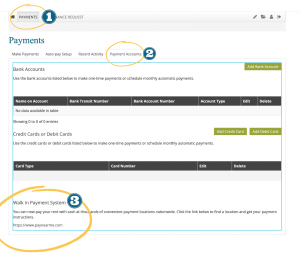
Login to the Resident Portal.
- Select Payments.
- Select the Payment Accounts tab.
- Scroll down to Walk In Payment System. Click the link to be connected to the Walk In Payment System.
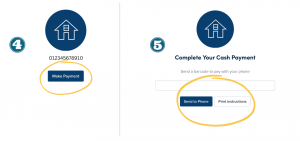
- Choose Make Payment.
- Verify your phone number. Select Send To Phone to text your barcode and payment instructions to your phone. Choose Print Instructions to print your barcode and payment instructions.
You can get your barcode by logging in to the Resident Portal. Once logged in you can obtain a mobile barcode or print out a PaySlip. (See How can I get my PayNearMe barcode? above for detailed instructions.)
Show your barcode to any participating CVS Pharmacy, 7-Eleven, Walmart, or Ace Cash Express to make a cash payment. A transaction fee of $3.99 will be added to your payment.
Keep your receipt. Brandywine Communities is notified of your payment the next business day.
Residents who have trouble logging in to the Resident Portal should contact their Property Manager for assistance.
Visit paynearme.com/yardicashmap and enter your zip code or city and state to find a retail location near you.
A transaction fee of $3.99 will be added to your payment up to $2,000 at CVS Pharmacy, Walmart and ACE Cash Express or up to $1,500 at 7-Eleven.
IMPORTANT: Be sure to add the $3.99 fee when making your payment. If you have not included the transaction fee with your rent payment, the agent will deduct the fee from your payment amount. In this scenario your rent will not be paid in full and your rental account will be considered past due.
Make sure you know your ledger balance before arriving at the participating agent or store location. Agents will not have access to this information. You can easily view your resident ledger via the Resident Portal.
Any overpayment will be considered a credit on your rental account ledger. Refunds are not possible through PayNearMe.